Router vs Switch vs Firewall: A Beginner's Guide
 Sep 17, 2026
 10:41 AM
If you're just starting out in networking, these three words show up almost immediately: router, switch, and firewall. At first glance they can feel interchangeable — all three touch network traffic in some way but each one is doing a fundamentally different job. Here's the simplest way to keep them straight:
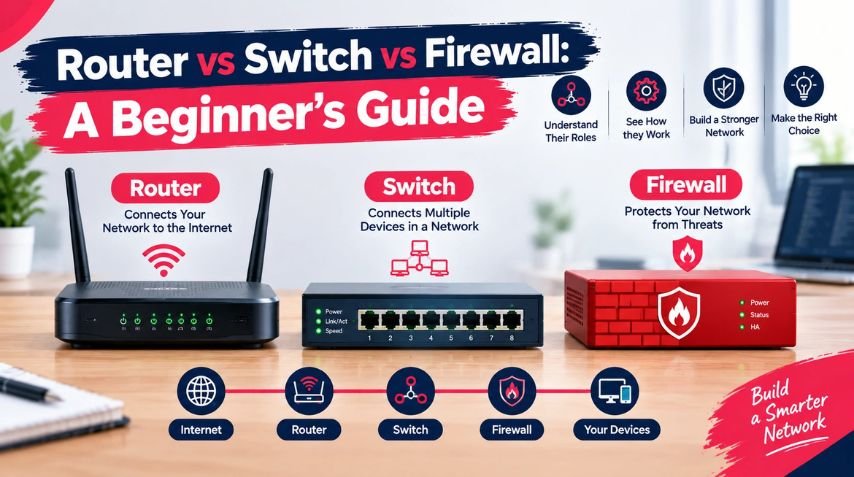
- A switch connects devices within a network.
- A router connects different networks to each other.
- A firewall controls and protects traffic based on security rules.
In a typical business network, you'll usually find all three working together. Understanding how they differ matters whether you're studying for a certification, starting an IT career, or just trying to make sense of how your office network actually functions.
Cisco describes switches as the foundational devices that connect computers, printers, servers, and other endpoints within a local network. Routers, by contrast, connect networks to other networks and decide where IP traffic should go. Firewalls sit apart from both — inspecting traffic and deciding what gets allowed through based on security policy.
Let's break each one down in plain language.
Router vs Switch vs Firewall: Quick Comparison
Device Main Purpose Works With Primary Job Router Connects networksIP addressesRoutes traffic between networks Switch Connects Devices MAC Addresses Forwards traffic within a LAN Firewall Protects networks Security policies, IPs, ports, applications Allows or blocks Traffic Router + Firewall Connectivity + Security Routing and security rules Connects and protects networks Layer 3 Switch Switching + routing MAC and IP addresses Connects devices and routes between them. Keep in mind these roles aren't always tied to separate boxes. Modern enterprise equipment often blends functions Cisco notes that many switches now include routing and security features, and some routers ship with built-in firewall capability. The function matters more than the label on the device.
What is a Network Switch?
Let's start with the device beginners usually find most intuitive: the switch.
A switch connects multiple devices on the same local network. Picture an office with 20 computers, 3 printers, 2 servers, several IP phones, and a few wireless access points — all of them need a way to talk to each other. That's exactly what a switch provides.
How Does a Switch Actually Work?
A traditional Layer 2 switch makes its forwarding decisions using MAC addresses. Every network interface has one, and as devices send traffic through the switch, it learns which MAC address lives on which port — building what's called a MAC address table over time.
DeviceMAC AddressSwitch PortPC-01AA:11:22:33:44:55Port 1PC-02BB:22:33:44:55:66Port 2PrinterCC:33:44:55:66:77Port 3ServerDD:44:55:66:77:88Port 4
So if PC-01 wants to talk to PC-02, the switch already knows exactly which port to send that traffic out of — rather than blasting it to every device connected to it. That efficiency is the whole point.
What Do Switches Actually Get Used For?
- Connecting computers, servers, and printers
- Connecting IP phones and wireless access points
- Expanding wired connectivity across an office
- Creating VLANs (on managed switches)
- Segmenting devices within a LAN
- Supporting the backbone of enterprise network infrastructure
Managed vs. Unmanaged Switches
This distinction trips up a lot of beginners, so it's worth pausing on. An unmanaged switch is built for simple plug-and-play connectivity you plug devices in, and it works, with no configuration involved. A managed switch gives administrators actual control: configuring VLANs, applying security settings, setting Quality of Service rules, and adjusting individual port behavior. If you're heading toward a networking career, understanding managed switches specifically not just switches in general — becomes important fairly quickly.
What is a Router?
While a switch connects devices within a network, a router connects different networks to each other.
Think about the path your traffic takes: your laptop → office LAN → router → the internet. The router is the traffic director sitting at that boundary, deciding where packets need to go next based on IP information.
How Does a Router Work?
Say your computer wants to load a website. It recognizes the destination IP address isn't part of its own local network, so it sends the traffic to its default gateway — typically a router or another Layer 3 device. The router looks at the destination IP address, checks its routing table, and forwards the packet toward the next hop. This process repeats across multiple networks until the packet finally reaches its destination.
What Are Routers Used For?
- Connecting a local network to the internet
- Connecting separate office networks or branch locations
- Routing both IPv4 and IPv6 traffic
- Supporting WAN connectivity
- Connecting different IP subnets
- Routing traffic between VLANs
- Acting as the default gateway for a network
As networks grow larger and more complex, with multiple possible paths between destinations, routing becomes increasingly critical to get right.
What Is a Firewall?
A firewall is fundamentally a security control, not a connectivity device. Its job is to inspect traffic and decide, based on defined rules, what gets allowed through and what gets blocked.
Here's a useful mental model: a router asks "where should this packet go?" A firewall asks "should this traffic be allowed at all?" Those are genuinely different questions, and keeping them separate in your head will save you confusion later.
How Does a Firewall Make Decisions?
Firewalls can evaluate traffic based on:
- Source and destination IP address
- Port number
- Protocol
- Connection state
- Application information
- Defined security policies
Traditional firewalls generally rely on packet filtering and stateful inspection. Modern next-generation firewalls go further, adding application visibility, intrusion prevention, URL filtering, and malware defense on top of the basics.
Why Do Businesses Actually Need Firewalls?
A business network typically holds employee devices, servers, databases, customer data, cloud connections, and remote-access systems — and not every connection reaching that network deserves automatic trust. A firewall lets an organization enforce real policy around what's allowed in and out: permitting legitimate business applications, for instance, while blocking unnecessary inbound connections from the open internet.
Firewall rules should always be built around an organization's actual security needs, not just switched on by default and left alone.
Router vs Switch: What's the Real Difference?
The core difference comes down to what each device connects and how it decides where traffic goes. A Layer 2 switch connects devices within a single LAN using MAC addresses. A router connects entirely separate networks using IP addressing and routing tables.
A quick example: say your office has Network A (192.168.10.0/24) and Network B (192.168.20.0/24). A switch can easily connect the devices within each of those networks — but moving traffic between Network A and Network B requires Layer 3 routing, whether that comes from a dedicated router or a Layer 3 switch.
Router vs Firewall: What's the Real Difference?
Both influence how traffic moves, but their core jobs don't overlap:
- A router's job: connect networks and route packets.
- A firewall's job: enforce security policy on traffic.
Some routers include built-in firewall features, and some security appliances can also route — Cisco's guidance even notes that certain secure routers now integrate next-generation firewall capability. But that overlap in the same physical box doesn't mean routing and firewalling are the same function. They're solving two different problems, even when they live in one device.
Switch vs Firewall: What's the Real Difference?
A switch is about connectivity; a firewall is about security. A switch might connect 30 computers inside an office without a second thought about what those computers are allowed to reach. A firewall is what decides whether those same computers can access particular external services, or whether unsolicited traffic from outside can reach them at all.
Some advanced switches do include security features, but that's not the same as replacing a dedicated firewall — the right setup depends on your network's size, security requirements, and overall architecture.
How Router, Switch, and Firewall Work Together
Here's where it all comes together. Picture a small company with 50 employees. A simplified network might flow like this:
Internet → Firewall → Router / Layer 3 Gateway → Network Switch → Computers, Servers, Printers, Access Points
The exact topology varies — modern appliances often combine these functions into fewer physical boxes — but conceptually, each layer still has its own job:
- The switch connects devices. Employee computers plug into switches, which handle local connectivity.
- The router connects networks. When traffic needs to leave the local subnet, routing determines where it goes next.
- The firewall enforces security. Traffic crossing a security boundary gets checked against policy — allowed, blocked, logged, or inspected further.
A Real-World Walk through
Say an employee opens a website from their office computer. Here's what's actually happening behind the scenes:
- The computer generates traffic — the browser sends a request, and the OS figures out where it needs to go.
- The switch forwards the local frame toward the right destination on the LAN.
- The default gateway takes over once the destination is recognized as outside the local subnet.
- The router determines the next hop for the IP packet.
- The firewall applies policy if the traffic crosses a security boundary.
- The traffic continues to its destination, assuming it's permitted — and the response follows the same path back.
This is really the whole point of understanding router vs switch vs firewall: it was never about picking one over the others. In a working network, they cooperate.
Router vs Switch vs Firewall: Where They Sit in the OSI Model
If you're studying networking seriously, the OSI model will come up eventually, and it helps explain where each device operates:
DeviceCommon LayerMain Identifier / FunctionSwitchLayer 2MAC addressesRouterLayer 3IP addressesFirewallMultiple layers (varies by technology)Security policy and traffic inspection
A basic Layer 2 switch works mainly at the Data Link layer. A router works at Layer 3, the Network layer. Modern firewalls — especially next-generation ones with application awareness — can inspect traffic across several layers at once. Don't assume every physical device maps neatly to a single layer; that assumption gets shakier the further you move into enterprise networking.
What is a Layer 3 Switch?
A common question once the basics click: if switches connect devices and routers connect networks, what exactly is a Layer 3 switch?
A Layer 3 switch does both — traditional switching plus IP routing decisions between networks. That combination makes it genuinely useful in enterprise environments, where, for example, an organization might use a Layer 3 switch to route between VLANs while relying on separate dedicated devices for security at the network's edges.
Do You Always Need Separate Router, Switch and Firewall Devices?
No — it really depends on the network's size and needs.
A small home network often runs on a single all-in-one device that bundles a router, switch, wireless access point, and basic firewall together. A larger business, on the other hand, usually deploys dedicated core switches, distribution switches, access switches, routers, firewalls, wireless controllers, and monitoring systems separately.
Enterprise network design comes down to balancing scalability, performance, redundancy, security, manageability, and budget — which is exactly why networking professionals need to understand what each function does, rather than just memorizing device names.
Which One Matters Most: Router, Switch or Firewall?
There's no real winner here — each solves a different problem:
- You need a switch when you're connecting multiple devices within a local network.
- You need a router when you're connecting different IP networks or reaching external ones.
- You need a firewall when you need to enforce security policy over what traffic is allowed.
In a professional setting, the real question is rarely "which one should I buy?" It's closer to: how should these functions work together to meet this organization's connectivity and security needs? That's the mindset worth building as you move from beginner concepts into real networking work.
Why Beginners Should Learn All Three
If an IT career is the goal, these three concepts form a genuine foundation — you don't need to master all of them on day one, but you should get comfortable with the basics first:
- What an IP address is
- What a MAC address is
- What a subnet is
- What a LAN is
- What a router, switch, and firewall each do
- How devices communicate
- How traffic moves between networks
- How security policy controls that traffic
Once these ideas feel familiar, more advanced networking topics become noticeably easier to pick up.
How This Connects to CCNA Training
If you're new to networking, CCNA-level knowledge is the logical starting point. DFW IT Career's CCNA Training Course in Dallas covers network fundamentals, IP addressing and subnetting, routing and switching, security basics, wireless networking, and troubleshooting — with hands-on labs built in for both beginners and working professionals sharpening their skills.
That's exactly why router, switch, and firewall concepts are so directly relevant to CCNA-level study. And if you're weighing CCNA against CCNP, our guide CCNA vs CCNP: Which Certification Should You Get First? walks through how to decide.
What Comes After CCNA?
Once your fundamentals are solid and you've got some practical experience under your belt, the next step for many learners is professional-level networking. DFW IT Career's CCNP Training Course in Dallas focuses on advanced, enterprise-oriented networking skills and is built for learners who already have basic networking knowledge or an existing certification, taught by an experienced Cisco CCNA/CCNP instructor. If you're considering that path, our guide How Long Does It Take to Get CCNP Certified? breaks down the exam structure, realistic timelines, and what can slow your preparation down.
Networking and Cybersecurity Are Closely Linked
Networking knowledge carries directly into cybersecurity. Firewalls, segmentation, access control, traffic monitoring, authentication, and secure network design all rest on understanding how networks actually behave.
If security interests you, take a look at DFW IT Career's Cyber Security (IAM) Training Program, or read Top Cyber Security Certifications to Boost Your Career in Dallas to compare certification paths. How to Build a Career in IAM: Step-by-Step Guide is another useful resource — it explains why networking fundamentals are foundational even for identity and access management roles.
Networking Skills Show Up in Plenty of Other IT Roles
Networking isn't just for network engineers. Help desk professionals troubleshoot connectivity issues daily. System administrators manage servers and network services. Cybersecurity professionals monitor and protect traffic. DevOps professionals work with infrastructure and connectivity. Cloud professionals deal with virtual networks, routing, and security groups constantly.
If you're early in your IT journey, What Does a Tech Analyst Do? A Complete Guide in 2026 explains how support roles build foundational technical knowledge, and How Dallas Companies Value Help Desk Professionals covers how that experience translates into a longer-term career path. If automation and infrastructure appeal to you more, DevOps Engineering is worth exploring too.
A Practical Learning Path for Beginners
Don't try to absorb everything at once. Here's a progression that tends to work:
- Networking fundamentals — LAN/WAN, IP addresses, MAC addresses, subnets, DNS, DHCP, TCP/IP, Ethernet.
- Switching — MAC address tables, VLANs, trunking, access ports, broadcast domains, STP basics.
- Routing — routing tables, static and dynamic routing, default routes, inter-VLAN routing, IPv4/IPv6.
- Network security — firewalls, ACLs, segmentation, secure remote access, authentication, basic threat concepts.
- Hands-on practice — build small labs, break things on purpose, and practice troubleshooting them. Diagnosing a problem is a far more valuable skill than reciting definitions.
- Certification — once your fundamentals are solid, consider CCNA and later progress toward more advanced certifications.
Common Beginner Mistakes to Avoid
Mistake 1: Assuming a router and switch are the same thing. They're not — a switch connects devices within a LAN, a router connects separate networks.
Mistake 2: Treating a firewall as just another router. A firewall's core purpose is security enforcement. Some can route traffic, but routing and firewalling remain distinct functions.
Mistake 3: Memorizing without understanding. Knowing that a switch "uses MAC addresses" isn't enough — you should be able to explain what actually happens when a frame arrives and how the switch decides where it goes.
Mistake 4: Skipping hands-on practice. Networking is a practical skill. Build labs and troubleshoot real problems instead of relying purely on videos and notes.
Mistake 5: Assuming every device does just one thing. Modern equipment routinely combines routing, switching, wireless, and security functions in a single box — learn the underlying functions first, and the device labels will make more sense.
Frequently Asked Questions
Is a router the same as a switch?
No. A switch connects devices within a local network; a router connects different networks and routes IP traffic between them.
Is a firewall the same as a router?
No. A router handles connectivity and routing; a firewall applies security policy to control traffic. Some modern devices combine both.
Can a switch replace a router?
A basic Layer 2 switch generally can't route traffic between different IP networks. A Layer 3 switch, however, can handle that routing function.
Can a router have a firewall?
Yes — many routers include firewall functionality, and some secure routers integrate more advanced security features as well.
Which is easier to learn: router or switch?
Switching basics are often more approachable for beginners since they start with local device connectivity. Both get more advanced as you move into enterprise networking.
Do I need to learn networking before cybersecurity?
Strong networking fundamentals are genuinely useful for cybersecurity, since many security controls and threats involve network communication — though the exact prerequisites depend on your specialization.
Is CCNA useful for learning routers and switches?
Yes. CCNA-level study covers networking fundamentals, routing, switching, IP connectivity, security basics, and troubleshooting — all reinforced with hands-on practice in DFW IT Career's current CCNA program.
Should beginners start with CCNA or CCNP?
For most beginners, CCNA is the more appropriate starting point, with CCNP better suited once a solid networking foundation is in place. See CCNA vs CCNP: Which Certification Should You Get First? for a full comparison.
Final Thoughts
Understanding Router vs Switch vs Firewall is one of the first real milestones in getting comfortable with computer networking. Keep the core distinction in mind:
- Switch = connects devices.
- Router = connects networks.
- Firewall = protects and controls traffic.
In a real network, these functions rarely work in isolation they cooperate to move traffic safely and efficiently. As you keep learning, try to move past memorized definitions and start tracing an actual packet's journey: how the switch handles the frame, how the router picks the next hop, and how security policy decides whether the traffic gets through at all. That habit of thinking in flows, not just definitions, will serve you well whether you're headed toward networking certifications, cybersecurity, cloud infrastructure, or systems administration. If you're just starting out, the CCNA Training Course in Dallas is a solid place to build your foundation. Already have the fundamentals down? The CCNP Training Course in Dallas is the natural next step toward professional-level networking skills.